You are an AdWords savant.
Revenue's through the roof.
Peeps search. Click. Browse. Buy. Repeat.
Like a literal printing press.
So you look around, searching for the next golden opportunity to deploy some of this capital that's burning a hole in your pocket like a poor man's Warren Buffett. (Which is to say, still pretty well off.)
You fire up some Facebook ad campaigns. Employ the same strategies that have already made you a small fortune.
And then… nothing.
No one's clicking. Or browsing. Or buying. That small stack of chips just got smaller, and you're starting to get antsy.
Here's why this happens commonly, and how to avoid it in the future.
Why Your AdWords Tactics Suck on Facebook
Google (ABC, XYZ, or whatever they're calling themselves these days) pulled in a $75 billion in revenue in 2015.
Not bad.
Unsurprisingly, the bulk of that revenue came directly from AdWords; as much as 68% of their revenue in 2014.
(What? You mean self-driving cars aren't profitable yet?!)
That single business unit is largely responsible with funding all that other crazy stuff they're up to. And with a virtual monopoly, it's a giant moat around their business that's the envy of every competitor.
For years, search (both organic and paid) has been listed as the best performing digital channel for new customer acquisition.
There's a reason.
Intent. People type in the exact words they're looking for. Many of which, tend to focus on evaluating their options or choosing the right solution. That means these visitors are commonly already in the 'bottom of the funnel', and have made up their mind to act soon (if not now).
In other words, people use search when they want to buy something.
Now contrast that with social. Where years ago, it drove less than one percent of sales in one study.
But if you look at how people use it, that's also unsurprising.
People don't go to Facebook to shop. They go there to get away. To browse, laugh, communicate, and most importantly of all – procrastinate.
(Why do you think this article took me twice as long as usual to write?)
People most certainly don't go to Facebook because you're running a one-day sale on power tools.
In other words, while search is based on intent, social is serendipitous. People find stuff almost by accident, because they weren't necessarily planning on finding that stuff in the first place.
This becomes a problem, when you try to shove a round peg in a square hole. When you try to use the same direct-response, intent-based advertising that kills on AdWords on Facebook, you're met with… crickets.
Here's what you should have been doing instead.
How to Structure Facebook Advertising Campaigns Instead
If peeps are in the 'bottom of the funnel' when they're searching for a specific term, you can go straight for the hard sale.
No funny business. No lead nurturing foreplay required.
BUT…
If they're not looking for your widget in the first place, you've got some work to do. There's no need awareness, so they have no idea who you are. Because of that, they probably don't need your stupid thing.
And even if the timing was somehow, miraculously, fairy-book-style perfect and they did need your thing; they probably have no idea who you are. Which means they don't trust you. Which means they ain't giving you their credit card.
These peeps are gonna need some good old fashioned lead nurturing. You're gonna need to wine-and-dine 'em. Until they're ready to… go.
That means your social (and especially, Facebook) campaigns need to align with these various critical steps, including:
- Awareness: Use content promotion to get on potential prospect's radar and get an understanding for what they're interested in.
- Lead Generation: Target this small, aware group of people with ready-made offers designed to get their permission to continually follow-up.
- Conversions: Now that you've already done the hard work of grabbing their attention, building interest, trust, (and hopefully, some urgency), a simple sales offer should get them to convert.
Here's how this works in practice.
1. Content Promotion
Even the best executed inbound marketing starts with interruption.
It's even right there in Permission Marketing – the OG that predated the HubSpot stuff by a decade.
The bad news is that on Facebook, you're not just competing with your competitors. You're competing for attention with people's friends and family.
Good f-ing luck.
The best way (well, easiest anyway) to compete is through content.
You need something that pique's their interests. Their hobbies. Or their fears and desires.
The New York Times does it with food that looks mouthwateringly delicious.

Quizony does it with a cheesy quiz, a BuzzFeed-esque question headline, an emoji, and… OK – an attractive female in cowboy hat.

Both examples use a carefully selected piece of content, textbook copywriting headlines, and evocative imagery that fits in exactly with what people's friends and family are also sharing on Facebook (namely, people and food.)
So it does just enough to fit in, and yet just enough to stand out.
You'll also notice that both of these are perfectly executed 'wordless ad' examples too. These ain't no low-budget operations we're talking about.
Targeting at this point is fairly broad, because you don't have any specific information to latch on to yet (like you will in the next two examples). So you can test different audiences by interests, who've liked other related media publications; refining by demographics (like location, age range, or gender) as you go.
2. Lead Generation
Sending a lead gen ad to cold people doesn't always work out well (for reasons discussed).
But sending them to people already primed increases your odds.
That means your next step is to target the people you've just interacted with (albeit, passively), retargeting your most recent website visits over the past X days (30-60 sounds like a good place to start).
By now you should know what they're interested in. A topic, a pain point, a problem. And they should hopefully remember who you are.
These can come in all different shapes and sizes. For many (especially B2B) this will still be a content-based offer. But escalating your offer to a free tool – like WordStream's AdWords Grader – might be the best way to reach “unicorn status” with chart-topping 10%+ conversions.
Marketo splits the difference with a 'free template' that busy, stressed out social media coordinators can use for their Social Editorial Calendar.
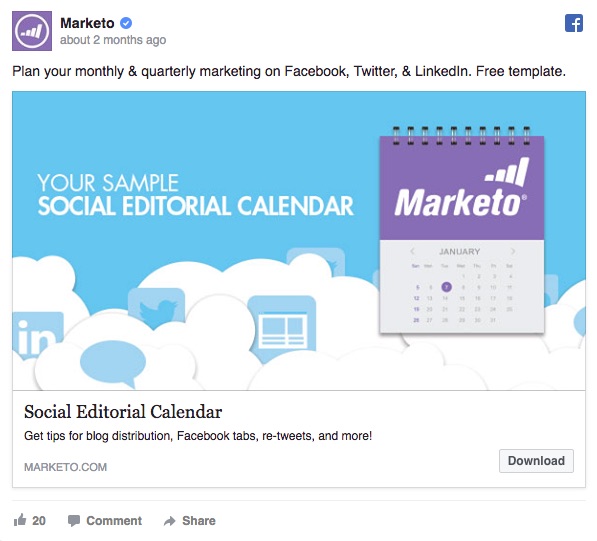
Obviously they've done this a few times, with a concise headline and description, relevant hero image, and proper CTA-use.
Marketo also does a great job keeping their headline short and to the point. AdEspresso researched over 37,259 Facebook ads and found that the ideal length is only 5 words!
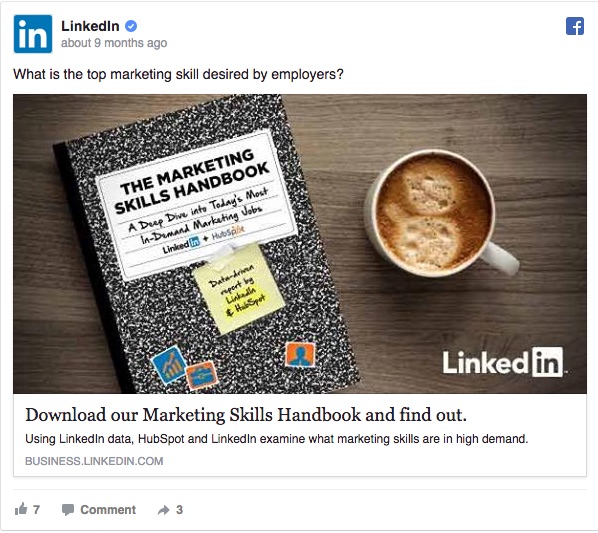
LinkedIn's Facebook ad (aaaaaaaaannnddd the world just collapsed on itself) is a perfect example of using proprietary research and data to your advantage. The benefit is that other competitor's can't (usually) come out with this same offer, giving you something truly unique and interesting to attract new leads.
AdEspresso & HubSpot teamed up for a similar approach, literally creating a 'Facebook ad formula' offer that distills something difficult (like creating successful Facebook ads) down to a copy & paste-approach for overworked marketers.
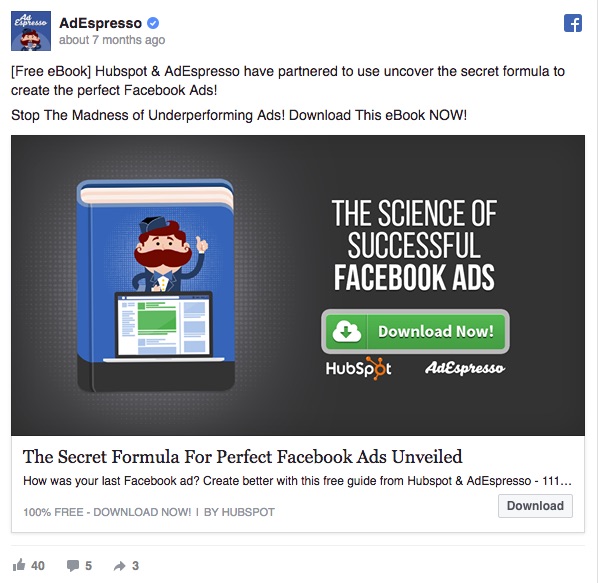
In addition to the standard Facebook CTA option, they also include a second one in the image itself to grab attention (with the logos cleverly placed underneath to boost credibility of this claim).
Ad testing becomes critical at this stage. As does analytics, like keeping an eye on which variables move the Cost per Conversion needle. (Adjusting accordingly as you go.)
3. Lead Conversions
It all comes down to this.
You've gotten their attention. You've warmed them up, while receiving detailed information about what they're interested in, dealing with, and trying to solve.
Now you just gotta close.
But not the used car salesman way. All the work you've done so far should make this step relatively straightforward, because you're targeting people who've just signed up for your lead magnet in the last section.
Instead, it's more like:
- Want this?
- Here's what you're gonna get.
- Here's what it's gonna cost.
- If interested, buy here.
Exhibit A: Pact Coffee
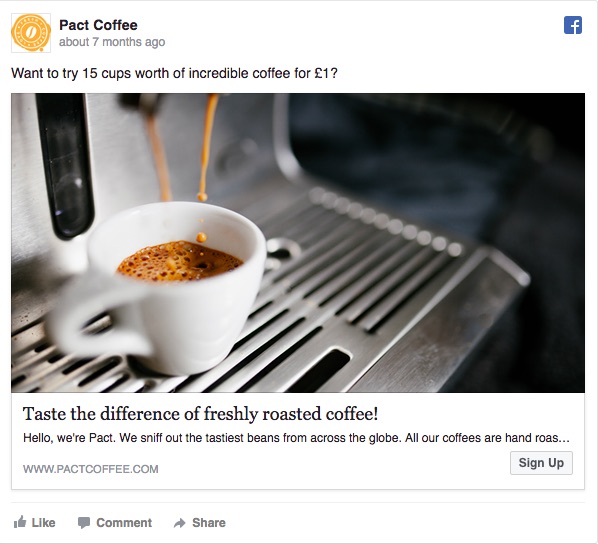
Want awesome coffee, conveniently? Looks delicious and fresh. Sign up here.
With some larger sales, converting directly from a Facebook ad is a tall order (no matter how many eBooks someone downloaded). A good technique to try is 'product splintering' (via Digital Marketer), where you create a simplified, low-touch version of whatever it is you're trying to sell.
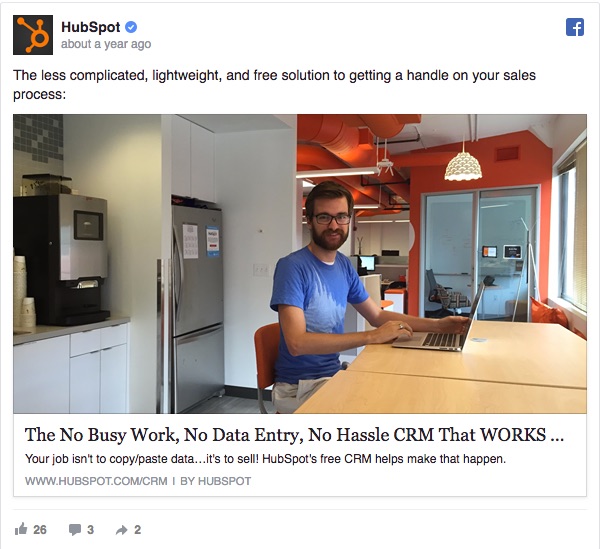
For example, HubSpot needs to put a little more oomph in their message because they're trying to advertise moderately expensive Sales CRM software. But they still keep things simple, focusing the ad message on their primary value proposition and pushing people towards the free version offering initially.
Pro tip: Another advanced method you could use for eComm is Facebook's Dynamic Product Ads, which will dynamically show visitors the product they just looked at on your website.
The Honest Company (which is somehow affiliated with Jessica Alba) used this method successfully to increase ad Click Through Rate 34% while also reducing Cost Per Purchase by 38% at the same time. So, that's promising.
(Also, including this last bit was a convenient excuse for me to Google: Jessica Alba. “Honey – it was research, I swear!”)
Conclusion
In 2010, GM made headlines by adopting the schoolchildren approach of 'taking their ball and going home', ceremoniously pulling their $10 million ad account off Facebook because it “didn't work”.
… Only to slink back later in 2013.
Facebook advertising options continue to evolve rapidly, with new ad formats coming almost monthly and unprecedented demographic targeting that other networks simply can't match.
It'll never convert like AdWords.
But that's ok. Because it can still work.
If you adjust and alter your approach to generate awareness, entice leads with interesting offers, and then focus on converting them to paid customers.
There'll always be some kinks to work out, as it's requires a completely different mindset.
But if you're reading this, you're smart. You'll figure it out.
About the Author: Brad Smith is a founding partner at Codeless Interactive, a digital agency specializing in creating personalized customer experiences. Brad's blog also features more marketing thoughts, opinions and the occasional insight.