Thursday, February 4, 2016

How Live Chat on Your Website Can Maximize Conversions

Live chat is the ultimate sales hack. It's a big call, but I stand by it. The reason is simple. It's the easiest way to bump your website conversions in real-time without split testing.


This won't come as a surprise to many of you who have already tried live chat to increase leads (and save on customer service). But, for most of you, it didn't work right away.


Websites like Kissmetrics and SaneBox (which trialed our service when we founded) have tried live chat, and the data was conclusive. There was no increase in conversions, and in some cases a reduction.


In this post, I'm going to deep dive into the data science and psychology of a successful live chat install, one that increases conversions.


The Theory of Chat as a Conversion Optimizer


In the past, businesses used advertising to drive customers to a phone number. Customers would engage with a sales person. Every phone call had a person on the other end.


Then the internet took off and put something called a website in the middle.


Now, all those customers see a website before they talk to a real person. We expect a website to do the heavy lifting. It's cheaper than humans, right?


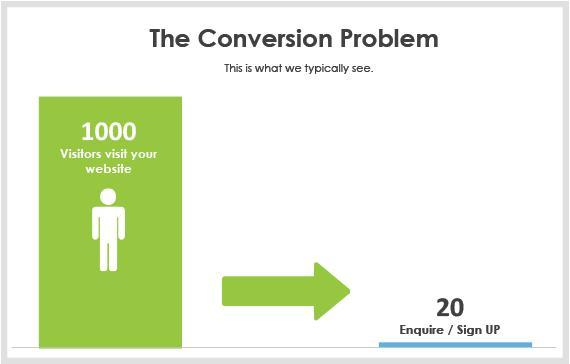
Not always. Statistics show that, on average, only 2% of website visitors convert to an enquiry or sale. There's an argument that lots of money is being left on the table.

the-conversion-problem


Non-optimized websites convert at 2%


Live chat is well positioned to be the fix. Real humans have a way of talking to the people you drive to your website.


And, with live chat, businesses won't need to worry if they don't have the money, time, or resources for A/B tests or a landing page designed by Oli Gardner.


In fact, you can have the world's worst site, or even a blank website, and still convert.

live-chat-engages-visitors


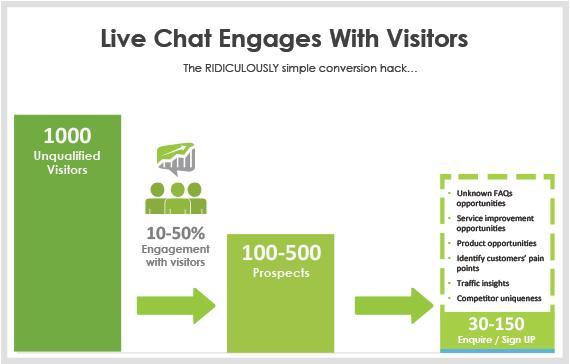
Live chat can generate 4-8x more leads


When you or your team sit on live chat, you should notice that between 10 and 50% of all your website visitors engage with you.


If done correctly, typically, a third of those should become a lead or, in the case of E-Commerce / SaaS sites, buy or sign up.


Beware: Live Chat Can Sometimes Reduce Conversions


Most people make the assumption that live chat will work in all conditions. You get to talk to your customers so that's a good thing, right?


Wrong.


Websites that convert well do not work well with live chat.


The psychology is simple. The visitor has likely come from Google and found their answer in 0.24 seconds. Then they hit your website, and it's almost always going to take longer than that to find what they want.


When they see a live chat button, it's an exciting moment. (Maybe for me, at least.)


Live chat is the path of least resistance.


But, this is not a good thing in situations where the website can outperform the live chat agent.


Take E-Commerce. Online stores are designed for buyers, and buyers are comfortable purchasing this way.


Proactive live chat can distract users away from the buying experience by seducing them into a conversation. Our research shows that a significant portion of visitors will choose chat over the prominent CTA.


And because the "add to cart" and "checkout sequence" is easier than trying to complete a transaction through a live chat agent, live chat reduces conversions.


Which Sites Work for Live Chat?


I get asked this all the time. Truth is, they all do.


But each type of site requires a different implementation.


The easiest way to prove the ROI of chat is to capture leads from the conversations. Tracking uplift in signups and sales is a little trickier.


  • If a website has a 5% or greater conversion rate, don't use chat until you've mastered everything mentioned below.

  • If a website has a 2-5% conversion rate, get some data (I'll explain shortly).

  • If a website has a conversion rate below 2%, launch chat immediately.


Get Me the Data!


On the sites that are converting well, I like to take a data-driven approach.


The homepage might have a great conversion rate, but what about the "About Us," "Pricing," or "Contact Us" page.


It's possible those pages aren't converting well.


Here's a live chat data checklist you can use:


  1. Create a list of all the main pages on your site likely to get prospective customers.

  2. Find the conversion rate for each page, split into business hours and after hours.

  3. For each page, find the average time to enquiry or signup. For example, from the time someone hits the page, it takes, on average, 25 seconds for them to start filling out the enquiry form, which they submit by 50 seconds.


You can find this information using Google Analytics, Kissmetrics, or specialized apps like Formisimo.


Who's Your Customer?


Before we look at how to use the data, we need to understand who the right customer is.


The idea is to move mountains in order to talk to your best prospects but not talk to time wasters at all.


Here's your customer characteristics checklist:


Question: Which countries do your best customers come from? Which countries do the time-wasters come from?

Answer: We get this data from ChartMogul.


Question: Which pages on your site are your best prospects likely to visit? Which pages are time-wasters likely to visit?

Answer: We look at the leads generated via our platform, and we look at the page chat was initiated on.


Question: Which page on your site has access to a login/support/area where visitors can log in?

Reason for the question: You don't want to waste resources annoying your existing customers.


Setting Up Live Chat for Conversions


Step 1 – Page Selection


Using the data above, install the live chat platform on the pages that mean the most to you.


Some chat platforms need you to install the platform on all the pages. This is to ensure that a conversation can continue if the visitor is clicking through pages.


Step 2 – Proactive Greetings


"Greetings" is industry lingo for automated chat popups. It's a critical feature for generating leads.


With most good live chat providers, you can set triggers for proactive greetings, such as:


  • Time on website (popup after a specific time on site)

  • First-time or returning visitor

  • Current page address is "…."

  • Visited the following page(s) "….."during this session

  • Referring website address is "…." (i.e., facebook.com, google.com, forbes.com)

  • User's country or city is "…."

  • Searched keyword is "…." (from a Google paid ad, or Bing)

  • Custom variable (via API into your CRM, software, etc.)


live-chat-greeting


An example greeting we use at LeadChat


Good live chat providers let you customize the opening sentence based on the greeting. This creates a more personalized experience for your visitor.


Here's Your Basic Greeting Setup Checklist:


  1. Have the "time on website" trigger set to "equal to or greater than the average time to completion of CTA/form." That is, don't distract people before you've given them a chance.

  2. If you don't have a user login area on your site (i.e., no existing customers), set a greeting to returning visitors starting with "Welcome back."

  3. If you do have a login section for existing customers, don't show chat on any page where they can access it (unless you are providing customer support which is a totally different beast).


Step 3 – SaaS vs Leads vs Support


Different applications need different setups. Getting it wrong will cost you.


SaaS Setup


Some companies want the website to do the heavy lifting without a sales person. Think E-Commerce sites or certain SaaS sites where you can sign yourself up without requesting a demo.


If the website is converting below 2%, do this:


  1. Answer a visitor's first question (usually a common FAQ)

  2. Ask for the visitor's name, phone number, and email, and tell them you'll get an expert to get in touch

  3. Point the visitor to the sign-up link and suggest they sign up

  4. Send details captured in item #2 to your CRM or marketing system and use nurture sequence to drive them back to the CTA


The idea is that you'll still have your same conversion rate on site, plus a few more people whose concern you solved.


And you'll also have a whole bunch of leads who wouldn't have converted during that visit, people you didn't know and wouldn't easily get back.


Then let email/content/automation or a direct response from your sales team do the work.


Lead Generation Setup


Using live chat for lead generation is becoming much more common.


Here's how to set it up:


  1. Have a FAQ or knowledgebase system that sits side-by-side with your chat console (or use a Google doc on another screen). This helps you answer visitors' questions faster.

  2. Have an easy way to capture lead information (for example, set up a Wufoo form with fields for name, email, etc.) This ensures that you have a separate place for all your leads.

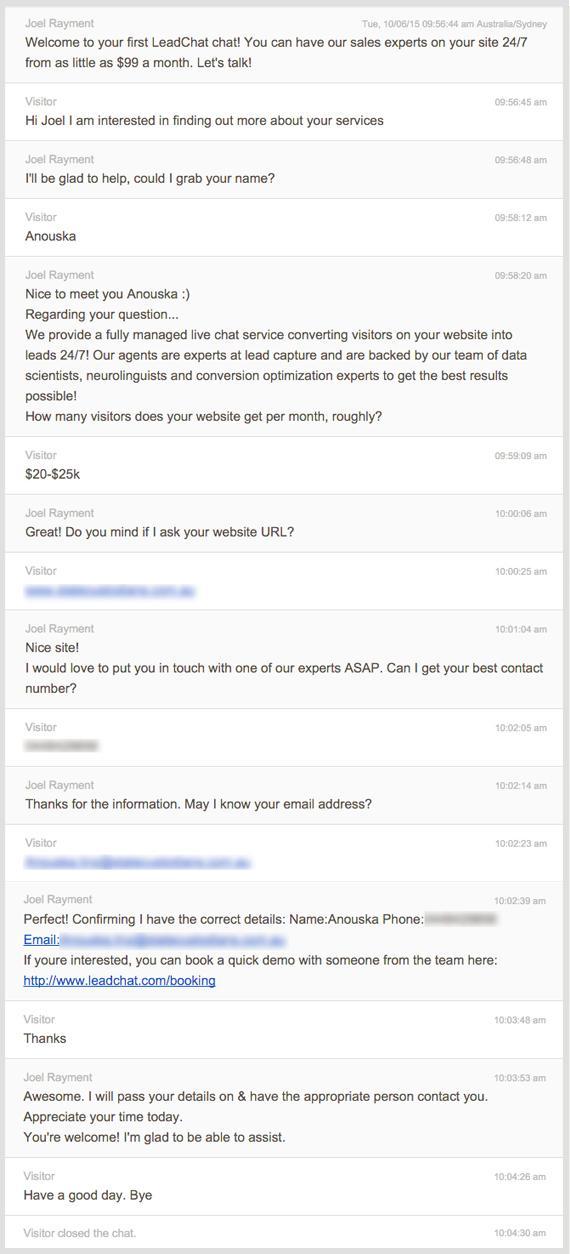
  3. During a chat conversation, don't be afraid to control the conversation and ask for details.

chat-transcript-example


An example lead generation flow we use at LeadChat


Expert Tip: I want you to imagine a scale with leads on one end and customer satisfaction (CSAT) on the other.


When a visitor comes to your site, what they're hoping for is to have all their questions answered, instantly.


What your business wants is the largest number of leads you can capture from your traffic and a reduction in your CPL. If you are just robotic and go for the kill, you'll get leads but tick customers off as well.


To each end, leads and CSAT are mutually exclusive.


The balance is to provide 5-7 FAQs in response to questions, and use an exit statement for anything else.


For example: "I'd love to get your question answered by one of our experts, who I'll pass your details to ASAP."


Customer Support Setup


Customer support is a different beast altogether.


The goal is to reduce the amount of email and phone tickets and resolve customers' issues on the fly.


The reason support works via chat is you can have the backwards and forwards in real-time without chewing tickets and email responses, which can take days or weeks to resolve, ultimately infuriating your visitors.


From my experience, you do need dedicated agents - people who know your product inside and out.


The best way to begin is to have your sales and/or product people handle support requests for one month. Then you can create a knowledgebase of all the questions and answers and provide it to agents you hire to do your support.


How to Choose the Right Chat Software


There are a few key players: LiveChatInc.com, Zopim, Olark, LivePerson, SnapEngage, and I'd throw in Tawk.to (because they're free).


Here's my list of things to look for (all of those listed above have these as far as I know):


  • Proactive greetings with customizable triggers

  • A mobile app

  • Mobile responsive chat widget for the end user


At LeadChat, we actually use the LiveChatInc.com platform because it's by far the most advanced.


LeadChat's Top 4 Chat Tips


1. Don't use offline chat (i.e., "Leave a message")

It's rude. People see chat, they expect chat. It's not nice to trick them into an offline form. Either have chat online, or off.


We find offline message capture still distracts people from the core CTA, with the added issue that there are no agents to respond to questions.


2. Answer within 15 seconds

If you have chat, you should answer people when they ask. 15 seconds is our rule of thumb. Anything longer is unfair.


3. Chat needs to be 24/7

Your website doesn't close, neither should your chat. After hours represents more than 60% of your week because two-thirds of the day is after hours and there are weekends. We see 50-60% of leads come through for our clients after hours. You can find chat agents on Upwork.com, Peopleperhour.com, or specialist companies like ours - LeadChat.com.


4. Use the data

Beyond leads, you will capture amazing insights through the chat transcripts.


Here are some things to look for:


  1. Traffic insights - Are you getting poorly qualified visitors and leads?

  2. Product opportunities - Are people asking for things you don't do? Consider offering those.

  3. Missed opportunities - Why are people asking about things you clearly offer? Maybe your website is not communicating this well enough.

  4. Top 5 FAQs -What are the most common questions? Could you fix your homepage to address these better?


Summary


Live chat is here to stay and is an amazing tool for communicating with visitors if it's done right.


Determine why you want live chat: More leads, more conversions, or to offer customer support.


Take a data-driven approach and create a benchmark. Follow the guide above and you're sure to get some great results.


I love seeing the proof cases, so please share your own live chat results in the comments below. I'll respond to every one of them :)


About the Author: Gary Tramer is co-founder of LeadChat, an Australian startup that helps businesses convert 4-8x more from their existing traffic. LeadChat does this by using a combination of data science, psychology, and neurolinguistics powered by technology and an incredible real human chat team.


Wednesday, February 3, 2016

Churn Rate Optimization: How to Reduce Customer Loss

CRO (conversion rate optimization) is a hot topic. And rightly so. Transforming visitors into buyers all starts with a single click. Any method that can increase your site's conversion rate is worth its weight in digital gold.


In this article, however, I want to dive deep into a lesser-known but profoundly more crucial CRO. This CRO is essential to long-term profitable success and oddly enough, you want to minimize it as much as possible.


This CRO is Churn Rate Optimization.


Customer churn rate — also known as "customer attrition, customer turnover, or customer defection" — is the amount of customers or subscribers who stopped using your product or service within a particular period of time.


The vast majority of both marketing budgets and marketing blogs are devoted to attracting new customers, instead of retaining the ones you already have. Ironically, the simple truth is this: churn rate optimization — reducing the number of customers who abandon your product or service — is far more essential to your profitability and long-term success than conversion rate optimization.


Why?


Consider the facts:


  1. Acquiring a new customer costs 6-7 times more than retaining and selling to an existing one (Bain & Company).

  2. 72% of customers who had a memorable product purchase took action to communicate about it positively to others (Harris Interactive).

  3. The probability of selling to an existing customer is 60-70%, while the probability of selling to a new prospect is just 5-20% (Market Metrics).

  4. On average, loyal customers are worth up to 10 times more than their first purchase (White House Office of Consumer Affairs).


Obviously, the incentives to reduce customer churn are high. But so are the challenges. Lowering your customer churn rate means understanding what makes customers leave and then putting steps in place from the moment they become a customer to ensure their experience keeps them coming back.


To do that, here's a simple five-step plan to discover your churn rate and stop your business from losing out.


1. Measuring


Naturally, before you fix your customer churn, you have to figure out what your churn rate is. Here's a very simple formula for calculating customer churn rate:


1-the-churn-equation


While stating your customer churn as a percentage is the most commonly discussed method, it isn't always the best for SaaS businesses. This formula automatically assumes that all customers are equal and worth the same.


With a freemium business model, you can see how this could be skewed, especially if you're losing free customers but gaining paid ones, or the other way around.


For businesses that need a more detailed approach, customer churn can be stated in any of the following ways:


  • Number of customers lost

  • Percentage of customers lost

  • Value of monthly recurring revenue (MRR) lost

  • Percentage of MRR lost


The value these different numbers have to your business will depend on the type of products you sell. For example, if you sell subscription packages at different price ranges, the lost MRR figure will tell you more about your status than the bare number of customers lost.


No matter which formula you use, it is important to continuously monitor your churn rate for comparison and improvement. This is where an all-in-one business dashboard comes in handy.


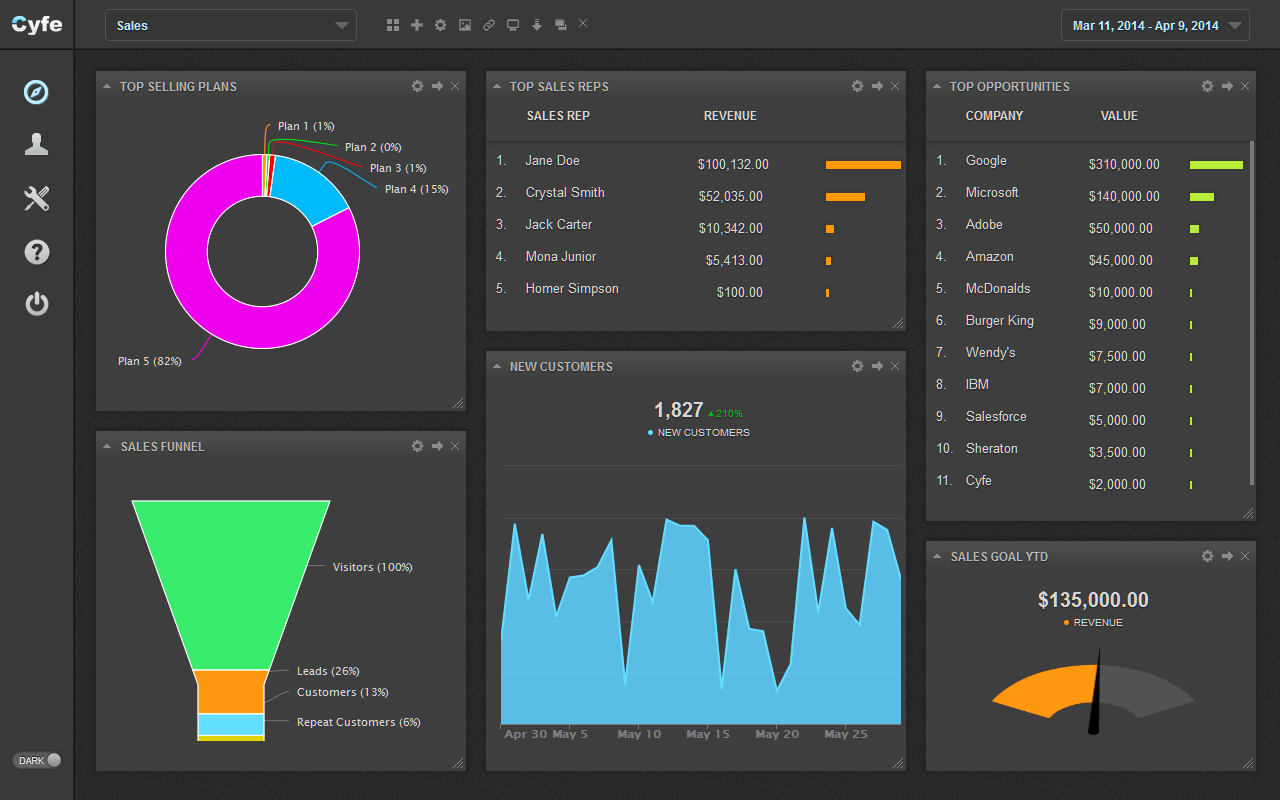
Cyfe allows you to pull in data from various sources - both online and offline - and bring them together on one screen to get a clear picture of your business' overall status. Part of this overall picture must include how your churn rate compares to your acquisition rate, i.e. the number of new customers you gain.


cyfe-screenshot


Image Source


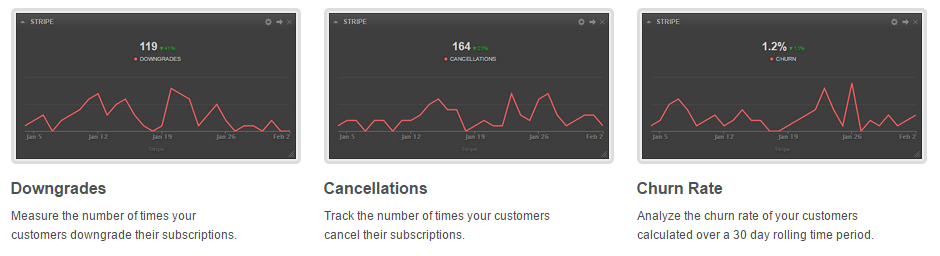
In addition to the big picture, Cyfe has three widgets specifically designed to monitor different types of customer attrition: downgrades, cancellations, and churn itself.


cyfe-screenshot-2


2. Understanding


To truly drill down into the mysterious world of customer behavior, you need some help.


When you've mapped out the sales cycle, it's time to see what visitors are doing on your site. For B2B companies especially, the sales cycle can be complicated and oftentimes the website is not utilized to its full potential.


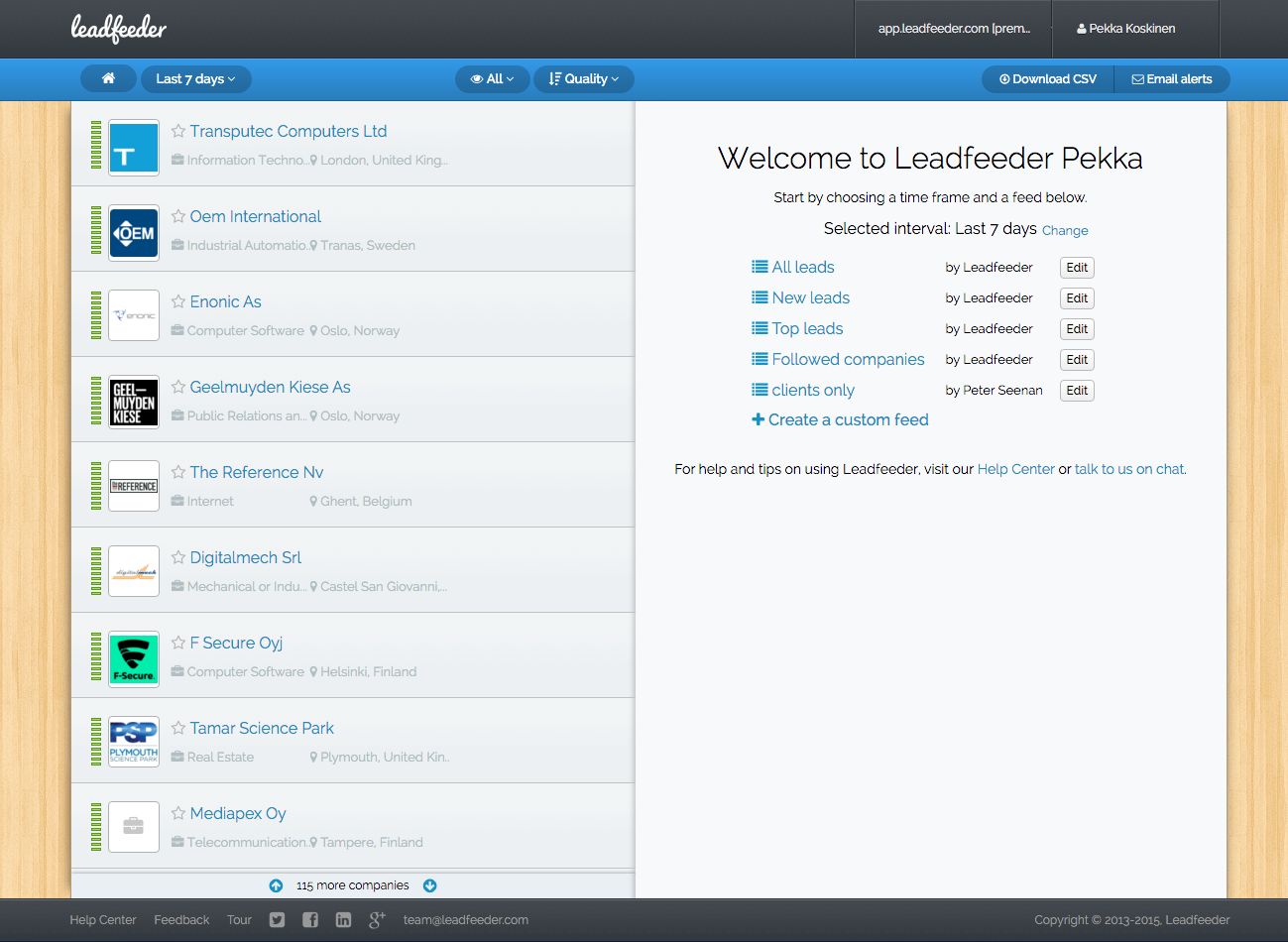
Companies like Leadfeeder provide B2B companies a Google Analytics based tool to see which company the visitors come from.


leadfeeder-screenshot


Image Source


The platform shows a list of companies that visited your website and allow you to click on the company to see which pages were loaded and how they found your website. Once you identify a prospective lead, you simply email it to your sales team or upload it to the CRM.


When you understand the types of companies interested in your product, you are well-positioned to understand how to approach them. More importantly, you can tailor your product to cater to the right niche within the industry.


google-analytics-leadfeeder


By narrowing down your focus you'll automatically decrease your churn rate and discover the real and sustainable potential of your service.


3. Onboarding


Decreasing your churn rate starts the moment someone becomes a customer.


This means the onboarding phase is crucial, because once a customer has made a commitment by signing up, particularly if they are spending money, they see things a lot differently. Namely, they experience what is called post purchase dissonance: a universal phase during which they are constantly assessing their purchase to determine whether they made the right decision.


In other words, you have a limited window to hook customers into your product and experience them as part of their daily lives. So how do you achieve that?


By getting them to invest time and effort in your product's key features and offering immediate and measureable results.


The best way to communicate to a customer immediately post-purchase is via email. The first email should be familiar: confirm their subscription/purchase and welcome them aboard. Some stop there, but you have the ability to do much more than that.


Instead, focus on building a robust onboarding process by creating a lifecycle email sequence. Here's a brief overview you can follow:


(1) The Confirmation Email


Welcome your new customer in a memorable and personal way. Include the relevant details, but above all stand out. The classic example of this is CD Baby's confirmation email, which started with the amazingly unique line: "Dear [Name,] Your CDs have been gently taken from our CD Baby shelves with sterilized contamination-free gloves and placed onto a satin pillow."


(2) The How to ... Best Feature Email


Follow up in the next few days by giving your customers a guided tour of your most beneficial feature. Keep it simple and just focus on one. Also, call attention to a customer success story of that single feature. Including a link to a case study is a phenomenal way to both promote your product and help them engage.


(3) The How to ... Get Even More Email


Next, highlight to 2-3 additional features and (again) call attention to the value they create. As a "PS," invite your customer to share their questions or successes with your product based on the best feature email you sent previously.


(4) The Time's Almost Up Email


If you offer a free trial period, send this email 72 and 24 hours before "time's up."


(5) The Bonus Email


This takes two forms. First, if your customer's free trial has ended, offer them an opt-in to extend service. Second, if they've already purchased your entry-level product, now is the time to ease them into the next offering. However, be sure your "upsell" builds on their previous success.


Unfortunately, lifecycle emails can be taxing to create and deploy, especially if you sell multiple products.


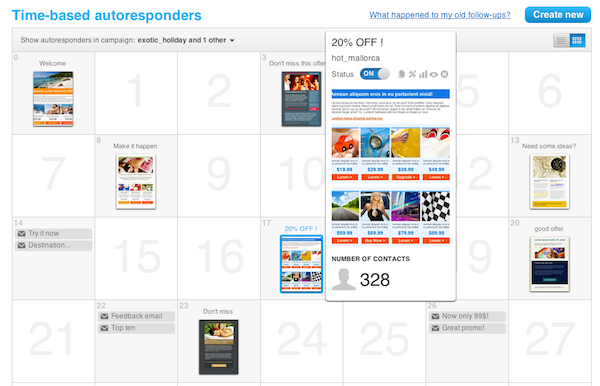
That's why it's vital to use an autoresponder like GetResponse that not only allows you to build and schedule drip campaigns but to insert "dynamic content" to personalize your emails. Dynamic elements can be done in one of two ways. First, variable substitution places dynamic fields in your email that can be customized based on your recipient's personal information. This is the most common form of personalization.


time-based-autoresponders


Image Source


Second, content insertion is one step beyond. With content insertion you can actually "switch out sections of content--phrases, paragraphs, even images--by inserting different content in different places within the text of your message."


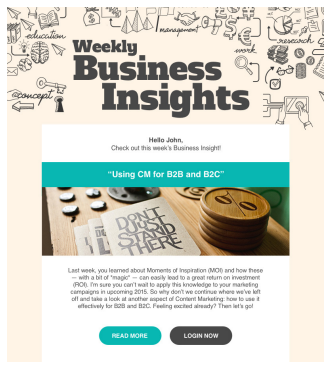
Here's an example of two emails, based on the same template, that utilize content insertion based on their customer's interests (i.e., what offer they originally signed up for and what pages they've viewed in the past).


weekly-business-insights-get-response


Image Source


4. Teaching


Once a customer is "on board," the next step is to keep them engaged. The best way to do this is through educating them even further, not just on using your tool, but on related disciplines to help them leverage your product for success.


Let's take a look at one SaaS company that's doing this excellently: Canva, an online-based design tool for non-professionals. Canva's interface is fairly intuitive, but can be rather daunting to a non-designer, so the first step they took is to teach new subscribers how to navigate the software and use the tools provided.


But that wasn't enough. Knowing how to use a tool doesn't mean you know how to create great, eye-catching, cohesive designs, and if users weren't feeling good about the finished product, they'd stop using the service.


So Canva created Design School, a series of in-product tutorials that teach users the elements of design and how to use them to create images for their blogs, businesses and personal use.


Another great email tool - designed especially for engaging your customers throughout their lifecycle - is Rejoiner. This email marketing automation platform specializing in recovering lost orders and reclaims profits through restoring customer's carts.


rejoiner-screenshot


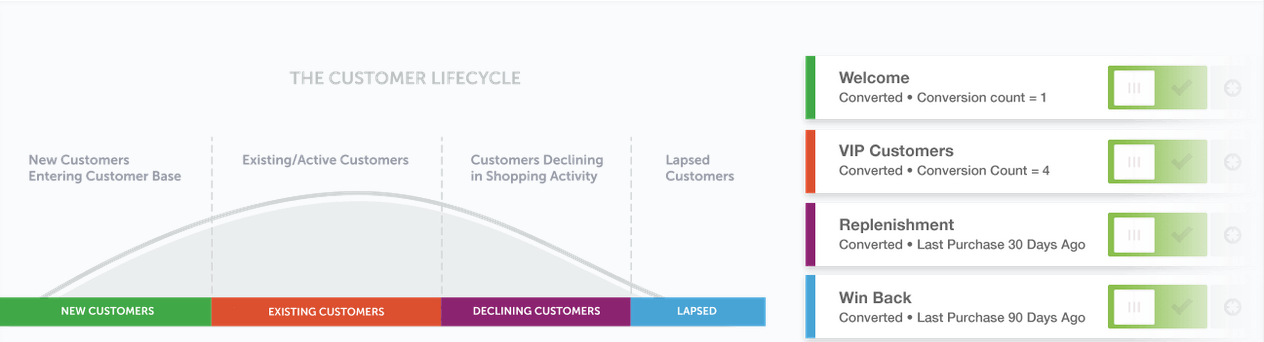
Rejoiner walks you through the entire lifecycle email process by breaking it down into four segments and then helping you build emails targeted at each one: New Customers, Existing Customers, Declining Customers, and Lapsed.


customer-lifecycle-rejoiner


Image Source


To adopt the techniques of Canva and Rejoiner for yourself:


  1. Be valuable. Don't just teach customers how to use your product; give them the knowledge they need tied directly to observable outcomes (i.e., results).

  2. Be structured. Set goals for your customers and reward them - even via social media or on your own blog or forums.

  3. Be positive. Highlight success stories and use case studies to help your customers discover ways to get more from your product.

  4. Be timely. Map out and anticipate the lifecycle stages of your own customers and create content specifically for them.


5. Solving


Bad service, broken promises, and less-than-satisfactory products are all top reasons that lead to customer churn. Here, your job is to anticipate the most difficult challenges your customer will face and solve these problems proactively.


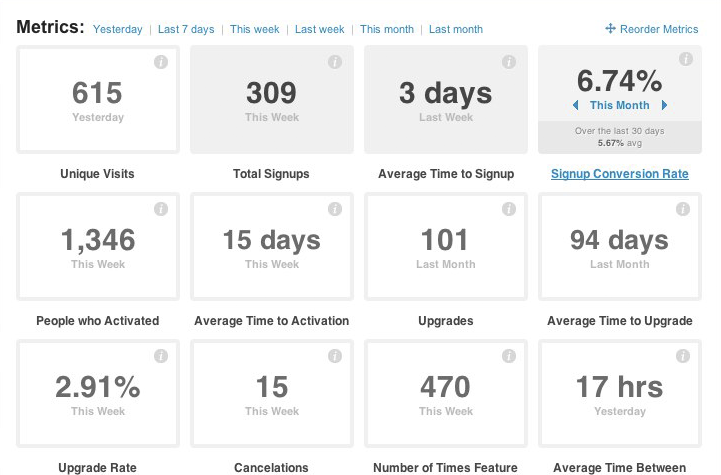
The best way to identify the challenges your customers face before they tell you is to assess their behavior when using your product. Tracking "in app" activity is especially important if you run a SaaS, and that's the focus of Kissetrics. Using in-app analytics and machine learning can help you make better-informed decisions to improve your product and retain your customers. By creating and tracking a behavioral funnel, you can evaluate your user's level of engagement:


kissmetrics-funnel-report-channel-origin-segmentation


Combining actual in-app use with your revenue and subscription rates lets you see exactly where the trouble spots for retention are:


kissmetrics-metrics-dashboard


After you discover what behaviors lead to customer churn - most notably, inactivity - you can take steps to adjust your product to satisfy unmet needs, or reach out to these customers directly and help them to get better acquainted with your product and achieve success. Again, autoresponder emails built around in-app activity - or lack thereof - is the first stage in this churn-reducing process.


Once you're armed with insight about exactly what the sticking points in your product or service are, you can also offer webinars and chat sessions specifically designed to address these customer needs. If you're a marketer, you're familiar with webinars as a lead generation tool. Here we're talking about personalized webinars as a way to increase customer retention.


Data like this, direct from your customers, is invaluable in assessing your teaching as well as catapulting them into the next step ...


6. Leveling


If your customers aren't paying for your best subscription level or buying your best products, it means there is room for leveling them up, i.e. upselling.


Upselling is often seen as a negative term, particularly because salespeople in traditional organizations tend to push unnecessary upgrades and additional products to make a higher commission. However, when upselling is done well, both the customer and the company benefits. Upsells should be recommended to current customers only when it will help them bring them a new level of achievement. In other words, when they win, you win.


If a customer has maximized the features of their current plan, an upgrade is the only logical step. If they stay where they are, they won't see any additional benefits. Therefore, when you notice they are approaching the limits of their current package, this is the perfect time to upsell.


So how do you level them up? By exposing them directly to the features available in higher packages and providing visual cues on what benefits they could be getting from taking the next step.


However, the most powerful tool for leveling up your existing customers is social proof, which means featuring reviews and recommendations that don't come directly from you. Managing social proof can be tricky, especially because - by its very nature - you aren't in control.


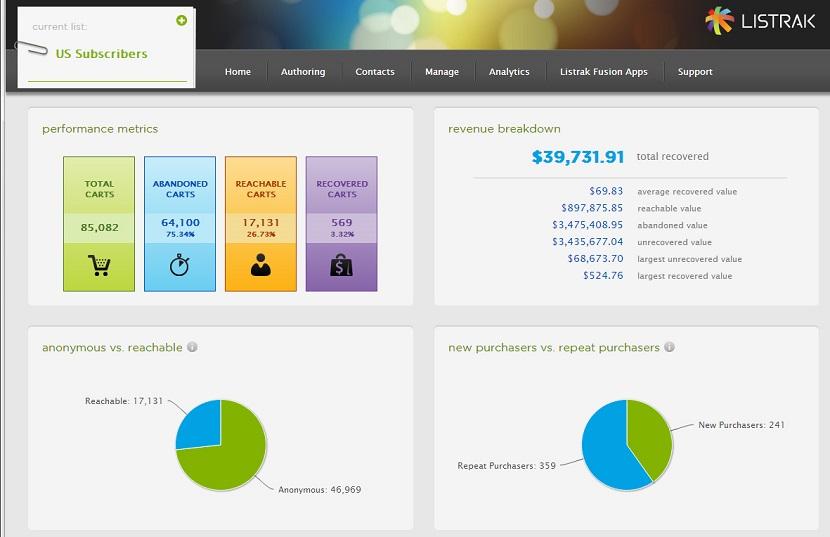
Enter Listrak, an omnichannel personalization and digital marketing automation platform. Listrak improves customer relationships through creating personalized experiences across multiple marketing touchpoints.


listrak-screenshot


Image Source


Listrak offer a suite of tools that create an effective integrated digital marketing campaign, which can maximize your ROI.


For instance, Listrak's "Social Marketing" is a time saver and potential profit booster. This feature allows you to request and track social proof without any external tools or heavy lifting on your end. Even better, you can insert personalized social proof in the form of social media mentions as well as independent reviews directly into both your email campaigns and webpages.


listrak-screenshot-2


Image Source


Reducing Your "CRO"


Unfortunately, we're all prone to focus more on customer acquisition than customer retention.


But the cold, hard statistics all point in the same direction: customer retention is insanely more valuable.


To optimize your customer churn (CRO), your business must:


  • Determine your churn rate and monitor it constantly

  • Help new customers to become familiar with your product with a robust onboarding process

  • Maximize the results they get by providing additional learning resources and demonstrating how others are using the tool

  • Identify those who have maxed out the benefits of their current package and help them to advance to a new level


With all these processes in place, you are certain to see a reduction in your churn rate along with customers who love your product and promote it to others.


After all, your existing customers are your best hope of bringing new customers on board, so you can focus on continuously optimizing and creating a better experience.


About the Author: Nadav is a veteran online marketer and the Founder & CEO of InboundJunction, an Israel-based content marketing company. Nadav helps well-known brands in boosting their online visibility through PR, SEO and Social Media.


Tuesday, February 2, 2016

Why Your Conversions Suck (And How to Fix It)

Average site conversion rates hover around 1-2%.


That means at any given time, you have another 98-99% of people just hanging out.


So... WTF are they doing?


They're looking, searching, procrastinating, hunting, browsing, considering, analyzing, evaluating, thinking, questioning, investigating, and comparing.


Basically they're doing a bunch of stuff — besides purchasing — that might, one day, hopefully, lead to a purchase.


Your goal, site owner, is to help move them along.


Here's how.


Are You Treating Different People, Differently?


When a site is struggling with low conversions, one of the first red flags is segmentation.


Or rather, a lack thereof.


(I've always wanted to use that word in a blog post.)


Specifically, are you treating all website visitors more-or-less the same?


The classic example is when AdWords traffic is going to your homepage. Or when your entire email database is seeing the same 'special offer' email.


If the best forms of marketing promotion are the right message, to the right person, at the right time, your website is no different.


The problem is that every single visit or session is unique (to a point). They're different people, with different levels of awareness, looking or searching for different things.


And when generic tactical decisions are applied to all, results suffer. Or are nonexistent.


But fear not. There is a way around this.


The key is to determine:


  • WHO is coming to your site (specifically),
  • WHY they're coming (motivation),
  • WHAT is their intent (what are they going to do when they get there),
  • And WHERE are they going to go (the next logical step)

Here's how to figure it out, and where you can improve.


Start Breaking Down Visitor Intent by Buying Cycle Stage


Most savvy readers are familiar with the buying cycle, or stages people go through before making a purchasing decision.


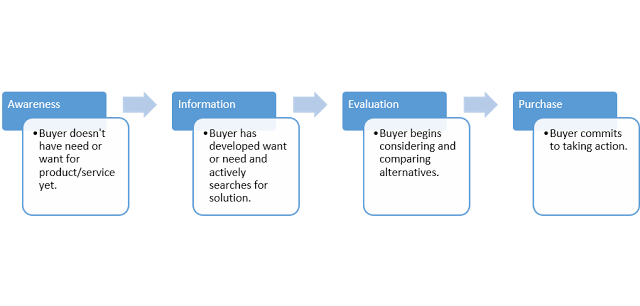
Typically your website visitors fall somewhere along the following:


  • Awareness: Although they're beginning to recognize a related topic of interest, many times they still aren't even aware they have a need for your product or service.
  • Consideration (or Information and Evaluation): Visitor begins to recognize a potential need for a solution, and is starting to evaluate potential solutions.
  • Decision (or Purchase): Here (and only here), is the visitor looking to actively make a decision to work with you in some capacity to solve their problem.

buying-cycle


The trick then, is to begin segmenting visitors by determining where groups of people might fit along this path.


Then, we can use this initial knowledge to help hypothesize the rest of the answers.


Awareness


Site visitors in the 'awareness' stage probably make up the bulk of your site traffic (assuming you're doing a lot of promotion and have at least a few thousand monthly visitors), making up anywhere from 40-70%


Because these people aren't need-aware quite yet (they might not even be brand-aware at this point), pimping sales offers is useless.


Instead, they're probably looking for some general information or education about some topic. That's why many of them tend to come into your site through blog posts (again, assuming you're actively promoting your site) and other unbranded pages.


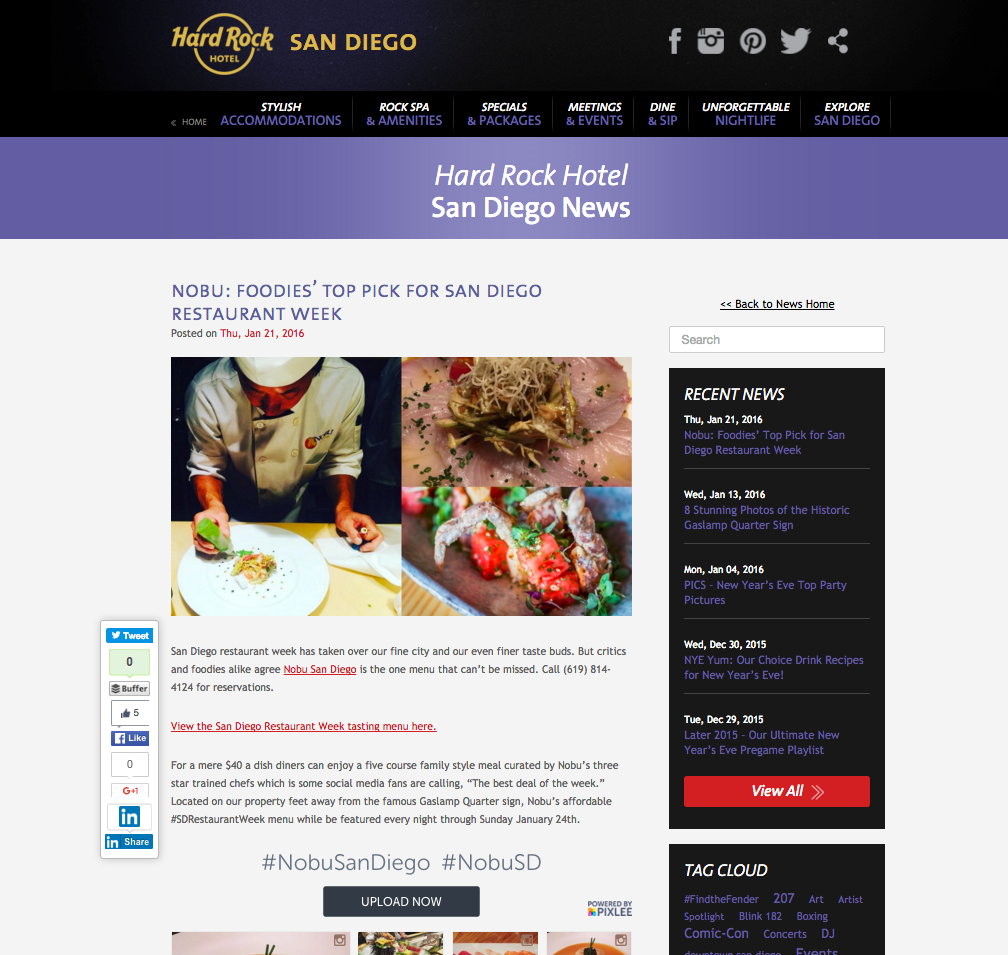
For example, a visitor queries 'san diego restaurant week' and lands on a blog post on your site.


hard-rock-san-diego-news-screenshot


These people are so far removed from being a good sales opportunity, so your goal is to start setting up micro conversions, of different levels, to get something — anything! — from them so you're able to continue following up.


First and foremost, keep them on-site! The Hard Rock's sidebar features a Search bar, followed by Recent News to keep people clicking around (other topically-related content or events in this case).


hard-rock-recent-news


They also feature a Tag Cloud with some of the biggest events also listed, including Comic-Con or the upcoming Valentine's Day.


hard-rock-tag-cloud


The blog post itself features other guest's experience with instagram, and provides a way for the casual visitor to see more about the 'scene' or even join the fun themselves.


nobu-san-diego


Last but not least, the blog post also features a Menu link to let people (a) browse to learn more and (b) entice them to recognize a need ("Hey – let's go get sushi!").


san-diego-restaurant-week


All of these little details have one goal in mind – keep people around long enough so they recognize that need and move into the next stage (of 'Consideration').


And if all else fails, you can use remarketing campaigns, like a restaurant week discount offer, to rope in visitors who're leaving without providing at least an email.


One awesome tip with shared external content is to create a server redirect that will fire a 'website custom audience pixel' within Facebook ads before ultimately redirecting the visitor. Then you'll be able to retarget these people on specific topics after they leave your site.


Check out this detailed guide on Facebook Ads cost if you're interested in figuring out how to get a campaign like this up-and-running.


Consideration


Once people have recognized some need in their life, a tiny little opening has been created that your brand might be able to fulfill.


Generally speaking, somewhere between 10-30% of your site visitors might fall here at any given time (don't check my math).


These visitors are beginning to consider their options and alternatives. Not only are they a little more knowledgeable about what you do at this point, but they're also beginning to recognize the jargon or local slang used to differentiate between things.


Like, for example, neighborhoods within a city when they Google 'Gaslamp hotels'.


hard-rock-hotel-san-diego-homepage


Not only are they looking for a hotel in Downtown San Diego, but they've also narrowed it down to a specific neighborhood, (hopefully) eliminating their other alternatives or options within a few square miles.


These people are ripe for a landing page, covering one specific topic (the one they were looking for!) in detail.


gaslamp-quarter-screenshot


When you've got someone on the hook, you can also use similar landing pages to keep them browsing around for a bit before bouncing. Here, Hard Rock uses the secondary navigation on the left of the content.


explore-san-diego-UI


The opening paragraph of the landing page perfectly positions the primary point on the page (wow, that was annoying).


Prominent (there it goes again) links pointing to the Hard Rock's rooms and nightlife options help to take someone who's already evaluating their options deeper into the site while also providing them a chance to show off what differentiates them best (like, a good time!).


hard-rock-san-diego-district


Decision


The main reason your website conversions suck is because only around 10% or less of current website visitors might be ready to make a decision.


The rest, as discussed, are chillin.


But the good news, is that these people know you. Chances are, they're looking for you by name with a branded search, like 'Hard Rock San Diego'.


hard-rock-san-diego-homepage


These peeps have looked around. They've considered a few alternatives. And in this example specifically, they've also utilized influential 3rd party sites like Yelp and TripAdvisor.


What better way to tempt someone so close to purchase with a special offer or package.


hard-rock-choose-your-experience


Hard Rock does a nice job highlighting the seasonal (and most profitable) ones first, while following it up with the more heavily discounted stuff at the bottom (so it's there, but... don't the other ones look way more fun!).


The drop downs help you quickly browse through the highlights of each package (even though it might be a bit wordy).


valentines-day-hard-rock-san-diego


So you're telling me that I don't even have to think about or plan this Hallmark holiday and I can just check-in with my wife while you take care of the rest? Here's my credit card number.


Also, if that red button with decent copywriting (complete with typo – whoops) doesn't entice you, there's a global footer CTA on the bottom of the page that funnels you into their booking system where you're trapped for all eternity. Just kidding. I hope... :(


hard-rock-valentines-day-copy


3 Takeaways to Increase Conversions


Phew. That was a lot of writing to make a very small point.


And that is: A/B testing a single element on a single page won't improve your site's conversion rate.


The way you make big conversion improvements it by making a lot of tiny ones, first.


Here's where to get started.


Tip #1. Make the Basics, Basic


Start by figuring out where you're at within each stage.


You know: user flows, page level user behavior, click tracking, surveys. All the 'blocking and tackling' of basic site analytics.


Then implement 'best practices'. A quick Google will provide amazing resources for all the basics, like the essential "https://blog.kissmetrics.com/landing-page-design-infographic/">landing page elements.


Also, make sure your S#!^ is fast. Ain't nobody got time to wait longer than three seconds for pages to load. Managed WordPress hosting company Kinsta has one of the best guides on the topic, in a Beginner's Guide to Website Speed Optimization.


Oh, also make sure you have enough traffic in the first place. Generally, that means A LOT. Most site owners would be better served by simply pouring more resources into the top of the funnel first, before over-prioritizing conversion optimization.


If you haven't got the basics covered, there's no point in moving on to the advanced stuff.


Tip #2. Form Hypotheses


After analyzing user behavior for a few weeks, the next step is to make some educated guesses about what they want, what's not working, and how you might be able to fix it.


Go on, stick your neck out. Come up with a few likely scenarios.


You may be wrong. But you also may be right. (Where have I heard that before?)


HOW can you improve a visitor's path and get them to logical 'next step'?


Should you remove pages, and make it easier? OR should you add options to increase Pages per Session (so visitors have a chance to become interested before moving onto the next step)?.


Convesrion XL has a thorough 'customer journey maps' guide if you're looking for concrete ideas.


Once you have 'path's and micro-conversions set-up, you can begin to drill deeper to see where stumbling blocks are, or gaps that can be improved.


And because you're focusing on the tiny interactions, it should be easier to iterate or make adjustments


Which brings us to…


Tip #3. Eliminate Distractions


It's impossible to improve overall website conversions from 1 to 2% in one fell swoop.


However it IS possible to begin fixing site conversions from Awareness to Consideration, and then Consideration to Decision. Optimize the little steps within the customer lifecycle to move the big needle.


Breaking it down into manageable chunks not only makes it easier to execute, but it also makes it easier to focus on making the right choices in specific scenarios to set you up for future success.


Execution is everything.


And in a world where options are limitless, constraints help prioritize that the important stuff — the biggest gaps or stumbling blocks along the entire customer journey — are addressed first.


About the Author: Brad Smith is a founding partner at Codeless Interactive, a digital agency specializing in creating personalized customer experiences. Brad's blog also features more marketing thoughts, opinions and the occasional insight.


Monday, February 1, 2016

Which Types of Content do B2B Tech Buyers Respond To Most?

It’s no secret: B2B decision makers have to slog through a lot of information. They need to be on the cutting edge of their industry yet still be adaptable enough to shift as the market’s demands and interests change.


Just getting to the key decision makers is an uphill climb, to be sure, but what if there were a shortcut?


A path you could carve, away from all the “me too” businesses and services aiming for a piece of that company’s profit pie – and still end up at the top?


Wouldn’t you want to know how?


The answer is all in the content.


But it’s not how much of it you produce that matters – it’s what you produce.


And these are the types of content that gets them to move ahead with a purchase.


How Much Content Do They Need to Make a Decision?


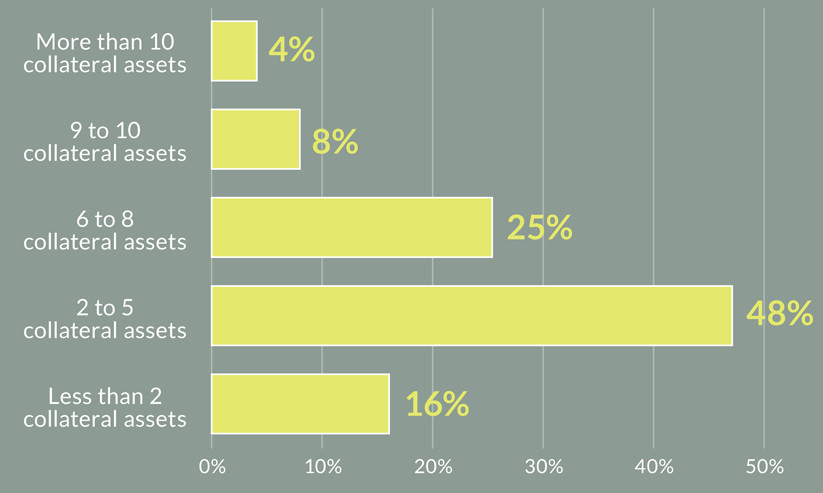
The recently revealed Eccolo Media B2B Technology Content Survey Report published by Eccolo Inc., pulls back the curtain on the buying habits of B2B technology decision makers. For example, they found that, on average, nearly half of those surveyed reported consuming only 2-5 collateral assets before making a decision.


marketing-collateral


Key B2B decision makers only need to consume as few as 2 pieces of collateral before deciding


That means if you’re pumping out lots of content in an attempt to sway them, you may be simply spinning your wheels in the mud. Instead, concentrate on creating less content, but making the content you do create better quality. Don’t just show why your service is a great deal or why your offer is irresistible – show the kinds of results it produces. Show how it performs “in the field.” Go the extra mile and do the research legwork that your competitors are unable, or unwilling to do.


What Kinds of Content Help Propel Their Decision?


Over half of respondents to the study reported reading an equal amount of emails and white papers. But when it came to influencing their decision, white papers were the clear leader:


whitepapers-emails


White papers were more often used as an influence tool than emails


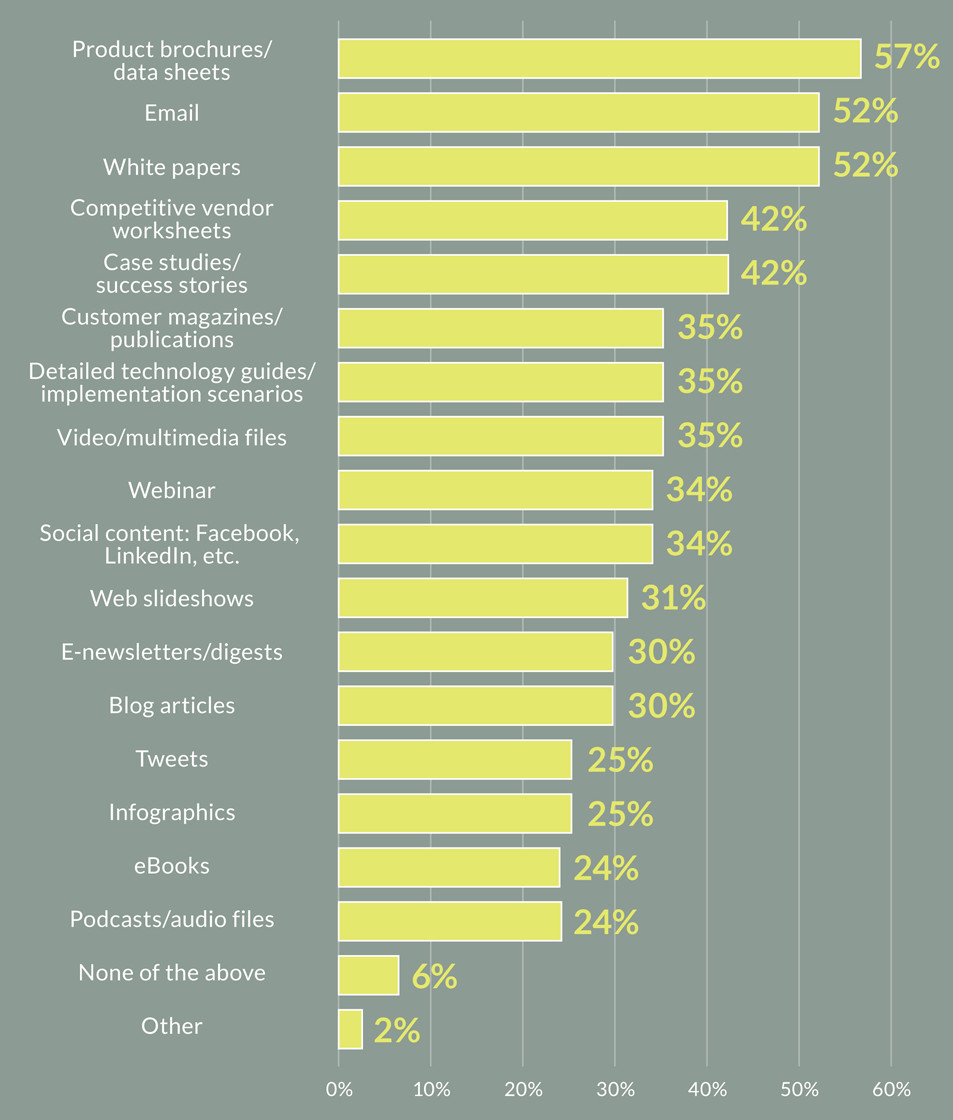
Before you set your staff to churning out white papers, keep in mind that it’s not that simple (it never is!) The study also went into detail on what types of content was consumed across 6 months to lead to a purchase. The results are pretty surprising:


types-of-content

Different types of content have varying degrees of success spurring B2B buyers on their decision


So What Can We Learn from This Information?


There are a few gold nuggets we can glean from the overall buying process of B2B decision makers. But what can we do with our existing content that will put the odds in our favor? Here are a few points to help:


Create a True Apples-to-Apples Comparison Chart


Having product/data sheets is all well and good, but notice that competitor vendor worksheets are also in the mix. Why run the risk of losing a decision-maker’s efforts when you can create your own comparison chart between your B2B service and those of your competitors? The more you can decrease the odds of them having to go offsite to see how your offer compares to others, the more likely you are to keep them engaged on what you do differently – and better.


Make Your Product Data Sheet Enticing


What’s more, a product/data sheet doesn’t have to be some boring overview. Make your best content work for you by bolding key phrases and benefits to stand out. Formulate your headers as questions to create a FAQ-style Q&A.


Make liberal use of bullet points to summarize key features, but include a link where more detailed information can be found. If someone read each of your bullet points and nothing else, would they understand the product enough to be able to make a confident buying decision about it?


Look at your product sheet not as data drivel, but as a way to address the B2B buyer’s key pain points. You have to know what they’re going through in order to present a solution that fits their needs. Talk about features, obviously, but don’t forget to include the benefits of those features in a way that makes sense from the buyer’s perspective.


Writing White Papers that Position You as the Authority


When was the last time you read a white paper that really stood out to you – like “These guys know what they’re talking about!” Never, right? First, don’t call it a white paper. It sounds boring and clichéd. Like a giant sales pitch – which is how many white papers are written. Remember, these are people who are actively looking for a solution. So present your paper in such a way as to address all of their concerns in a way that’s easy to read and understand.


You may want to re-brand it as a “Special” or “Insider” report. Take the time to answer the most common questions and back up your statements with clear, comprehensive proof. This is where the real meat and potatoes of your benefits comes in. Lay out precisely how the decision maker, their team, their company and their customers will benefit from your solution.


Think of your white paper not as a sales vehicle, but as a friendly guide – gently moving the decision maker down through each stage of your funnel in a way that doesn’t feel like a pitch, but more of a mutual understanding. You want the reader to come away with a deeper, fulfilled and complete picture of your solution and how it ties in with their existing needs.


Don’t Forget Your After-the-Sale Content


Oftentimes when closing a client, you’ve poured all your efforts into making their decision as easy and hassle-free as possible. Once they’re all set up and acquainted with your solution – don’t let them simply dry up and wither on the customer vine!


This is the prime time to follow up with upgrades or details on how they can get the most out of your product or service, as well as how to use it to build their business, retain their customers or experience growth faster or more fluidly than before. Remember that no one wants to feel like they’ve been duped or made a fool of. And if communication dries up after the sale, that’s precisely how they’ll feel.


By taking the time to not only write the kind of content that compels them to decide, but walk them through the process and guide them through each step – you’re showing these key decision makers that you’re not “all about the sale”, but rather all about the journey they’re taking to create a better experience for their own customers. And that’s the kind of journey you should take – together.


Do You Sell to B2B Companies?


What have your experiences been with using emails, white papers and data sheets as content to help spur their choice? Have you had different results than those reported on the surveys? Finding that a different method works better? Tell us about it in the comments below and share your story!


About the Author: Sherice Jacob helps business owners improve website design and increase conversion rates through compelling copywriting, user-friendly design and smart analytics analysis. Learn more at iElectrify.com and download your free web copy tune-up and conversion checklist today!